Post #11 Templates For Scripts
Another brief blog post this week as I have been busy on both a coding course and a programming exercise, which, when I get it working, I shall share. Going back to my roots with a simple fluid dynamics code. So for this week I shall simply share the templates that I have made and use, with reminders in place, for making different kinds of ABAQUS scripts.
Templates are great. They save you time hammering out the boilerplate and forgetting that basic detail that you are so used to seeing it slips your mind. They also impose a common look and feel to your code, and remind you not to backslide on commenting, docstrings and other such niceties.
Module Template
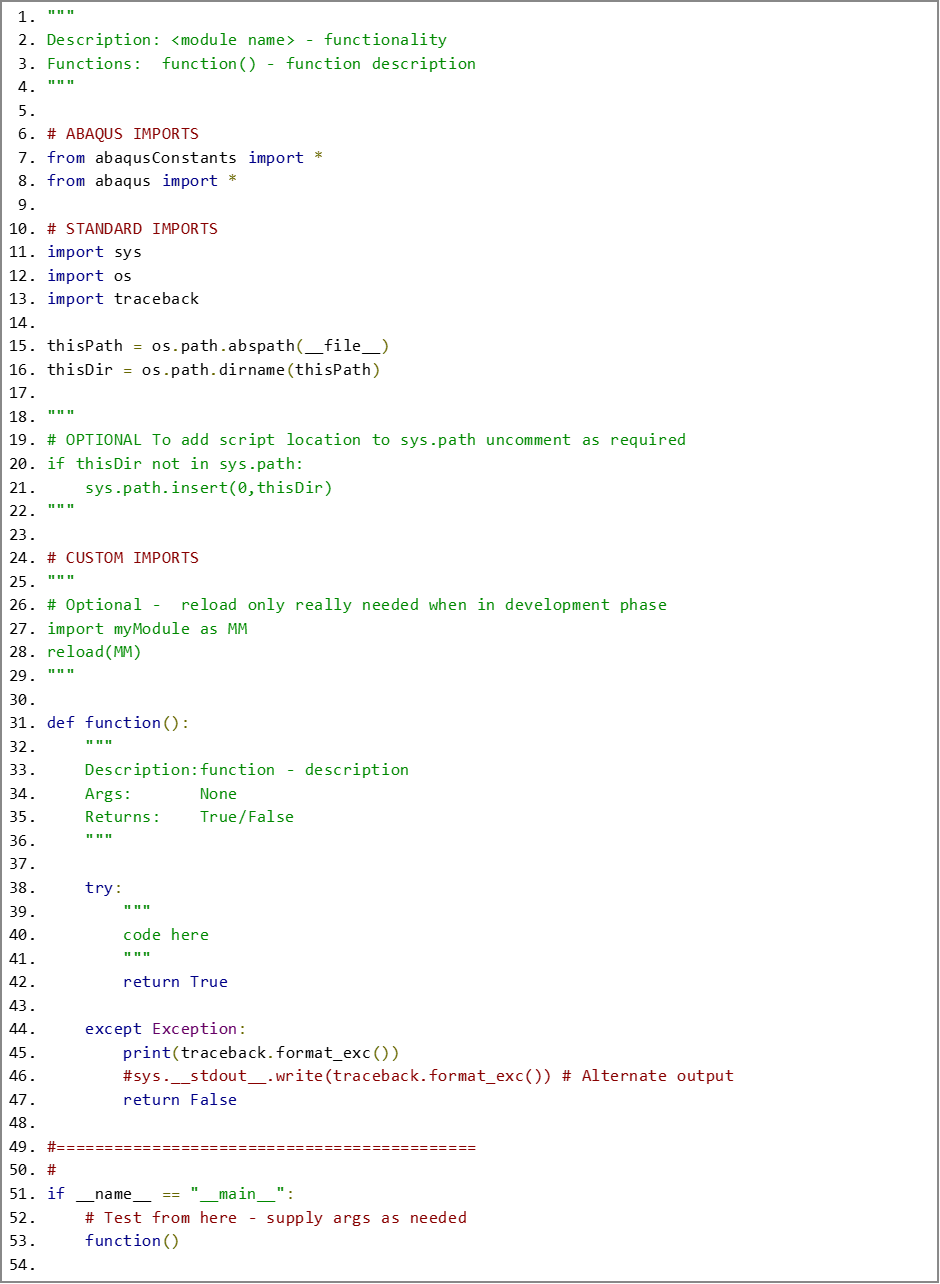
The most basic script that you will write, aside from a recorded macro, with all its inherent limitations, is the single module script. The structure in Figure 1 is what I use on the day to day, keeping a copy of this file to SaveAs and create a new module file.
I think the template has all the key features, someone please correct me if I am missing something, that gets you ready to go with just renaming and populating the first function in the module.
The module docstring at the top is helpful both for potential users and as a summary of the file contents if you add multiple functions in the same module. Every function should have its own docstring, which is also baked in here.
The custom imports section is for modules of your own creation. The reload statement is not normally needed but it is helpful when you are developing your code as it keeps all the changes in other modules up to date.
Never forget the last section, it allows you to run the named function!
Kernel Plugins
Running your script via the File -> Run Script is fine, but a bit clunky so the next step is to convert it a kernel plugin, which is very easy and a tiny overhead, especially if you have a template for the plugin. There’s a theme here…
The functional code in Figure 2 is very short. The bulk of the template is made up of reminders of what to do with it and which setting to use, delete after use.
Adding an icon to your plugin menu entry is optional. I generally don’t because:
Life is too short to add pictures to functions only I am going to use.
The icon file has to be created at exactly the right size, and all of them should be the same size, another template.
An easy gotcha is to forget the parentheses in the function name, forget those and nothing happens.
The button text is about organising in your plugin menu, it does not have to, and usually doesn’t, match the folder structure in your plugins folder. The ampersands are optional for shortcut key combinations and do not have to be on the first letter.
The help url is accessed via the plugins menu and is the route to launch your help file, if you have one. Note that you need to supply the full file path to the html file.
Using the kernel plugin means you can organise and more easily access your kernel scripts and store them alongside your GUI based plugins. More convenient and a more professional feel for the price of one extra, small, file in the same folder as your kernel script.

GUI Plugins
GUI plugins get much more complicated quite quickly but having a template that lays out the basics, so you don’t forget to add them is always helpful.
To avoid confusion, it is best to keep to a simple naming convention that clearly keeps the mode (the _plugin file) and the dialog definition file together. Remember that the _plugin file must always end with plugin or it will not be included in your plugin collection. I name the files to match the name of the plugin. For example:
The mode file would be myPlugin_plugin.py, containing the form class MyPlugin_plugin.
The dialog definition file would be myPluginDB.py containing the dialog class MyPluginDB.
This works for me; your mileage may vary. Whatever you choose, keep it simple and keep it consistent.
Mode File
The mode file is shown below, Figure 3. It is slightly more complex than the kernel plugin because in addition to registering the plugin, the last section of the code, which is similar but not identical to the earlier case, it also creates the mode, which holds all the keywords, and loads a dialog definition to display those keywords in controls.
The important things here are:
The keywords being defined in the AFXForm derived class constructor.
The getFirstDialog function, where the dialog definition is imported and returned, which is automatically called at run time. The module name and class name here must match the names used in the dialog definition file. So, using the example names from earlier, getFirstDialog would be importing myPluginDB and returning the class object myPluginDB.MyPluginDB.


Dialog Definition File
Quite a lot of the dialog definition is optional and can be omitted if you are happy to use only the standard action buttons e.g. OK and Cancel. Once you have your own controls that generate events that need handling, like buttons, you will need to incorporate all the elements for message handling:
The message map: a list of unique ID numbers that identify messages generated by user interactions with the buttons.
A collection of FXMAPFUNC macro calls to tie the message ID to a designated handler function.
The handler function itself.
If you want some sort of interaction between the user and the dialog, e.g. doing some sort of preliminary calculations before the user commits to running a kernel script, that introduces another complication. To handle changes in the values of controls the function processUpdates is required. This function is automatically called in idle time and checks the values of specified controls for changes. If changes are detected then handling functions can be called.
The dialog template only has a stub of a UI design, in this case two columns are set up to receive controls. I have found it helpful to increment the names of container elements like the vertical frame by 10, to allow for additions to slot neatly in. Alternatively give them unique and descriptive names, which is probably better practice.


I hope that you find these templates useful. If you do, or if you think I have missed something important please leave a comment below.


Comments