Post #7 Dynamic Inputs
Sometimes user input is essential for your script... the next best to no GUI is a simple GUI.
I stated in a previous post that user interfaces for your ABAQUS scripts should be avoided wherever possible because they complicate the code and make it more time consuming to change. If you really must have a GUI then the simplest one possible should be used. The most basic is a kernel dialog where the user enters data into a text box, without any kind of feedback. This was used in the example in my last article.
The kernel functions getInput and getInputs accept text input from the user and return text values, all from within the kernel, removing the overhead of creating a true dialog box. It might be convenient to wrap getInputs, the more useful of the two because it can accept one to many inputs, into a reusable module that could create this type of dialog on the fly for any project.
The examples that follow do just that. Both of these examples are dynamic, in that as many entries as are required can be passed as an argument to the dialog creation function. The argument variables can be of any type that makes sense for a text box and will be returned as the same type. It is a small extension of the example in Chapter 6 of my book ABAQUS Scripting Springboard.
Returning Lists
In the first instance, a list of lists is used as input and a list of values, of the correct types, is returned. The input sub-lists contain a string prompt for what each variable is and a default value. The function updates the values in the input list with the user’s choices. This allows the previous choices to be maintained if the dialog is used within a loop, as in the demonstration program.
The function DynamicVariables returns the values from the input lists so if the user cancels out then the default values will be returned. A list of values is returned, the order and type of the return values match those of the inputs.
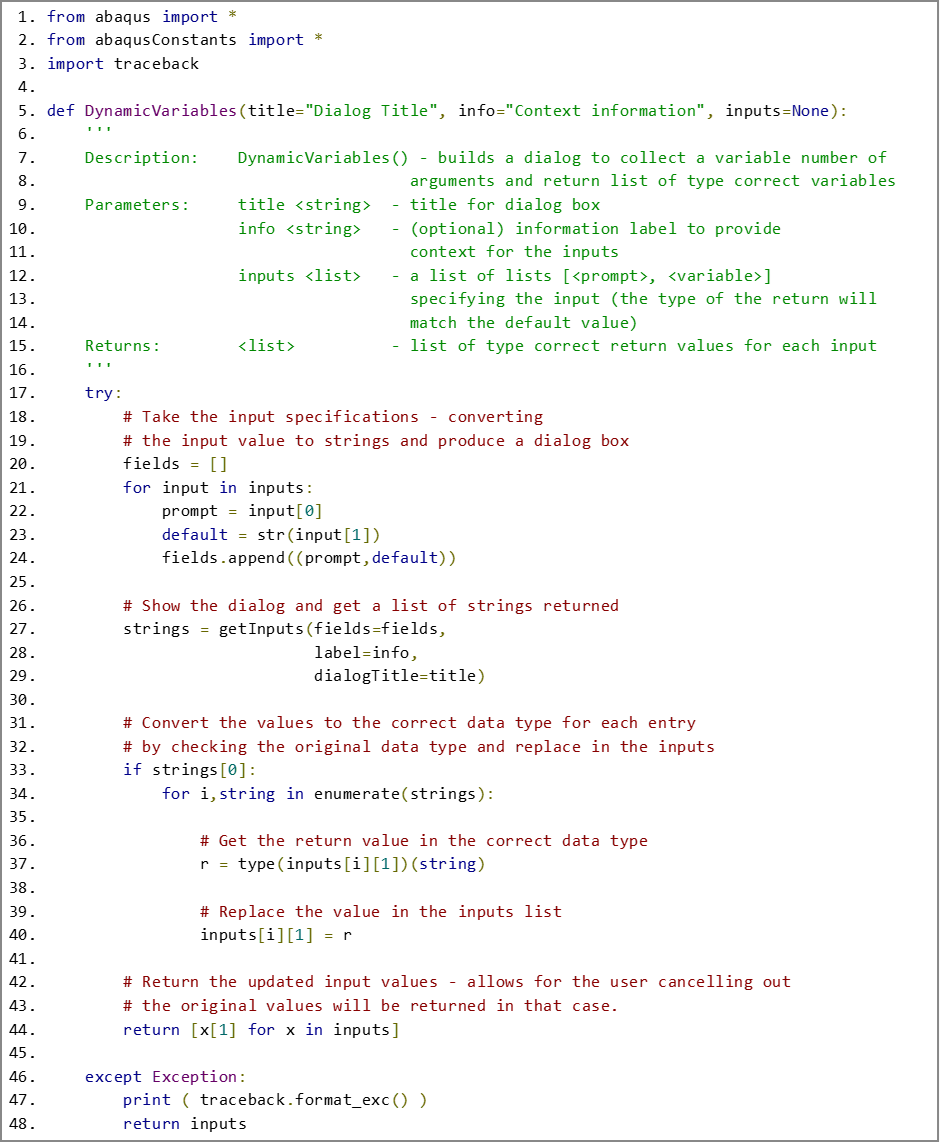
DynamicVariables is employed in the bare bones demonstrator below. By basing the inputs on lists the entries can be updated so, as here, the previous user input values can be retained for future use, while inputs remains in scope.

Returning Dictionaries
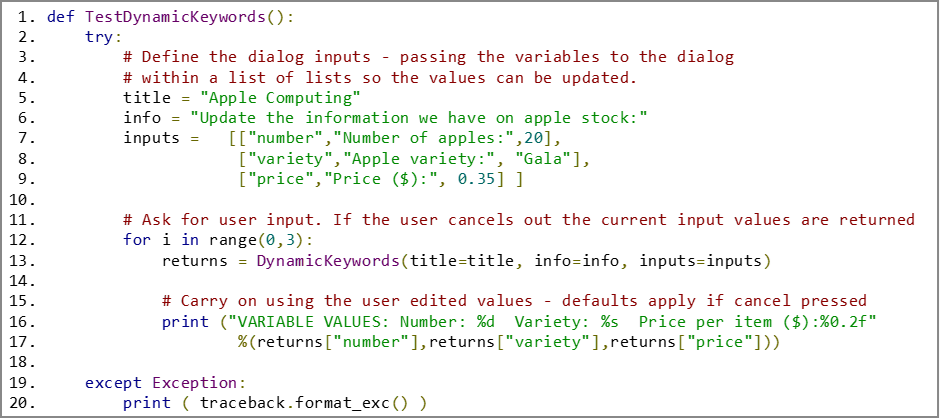
The above example is fine but leaves the user needing to keep track of the order of inputs and outputs, which can become problematic when a large number of variables are being considered. For cases where a lot of variables are needed it might be better to have a little more structure to both the inputs and the outputs and use a dictionary. This is shown below. Once again a list of lists is created. This time each sub-list contains a keyword, a prompt, and a value. Again, by updating the values in the input list, the user's choices are stored while the inputs list remains in scope in case the script needs access to the previous values.
The returned value is a new dictionary that contains just the correctly typed value for each keyword.
A list of lists was used to feed the function DynamicKeywords to preserve the declaration order and structure in the dialog box. If the order in which the variables are seen doesn’t matter a dictionary could equally well have been used, the dictionary comprehension that creates the return value would have been similar. Alternatively, an ordered dictionary could have been defined and used as input, try this for yourself!

A minimalist demonstration case is shown below using DynamicKeywords. Returning a dictionary is compact and makes it clear in the code where the variable value came from. It is much more convenient if large numbers of variables since you do not need to ensure that the order is matched to the list of variables receiving the returned values.
Conclusions
The examples above can be wrapped up into a module that you can import and reuse in any project, to get correctly typed user input easily, without the overhead of a true GUI.
A more structured return, via a dictionary gives more control where the script needs a larger number of variables. More extensive checking could be applied to the inputs, for example ensuring that a yes/no answer has been given and the return type could even be a custom class for more complex data. These very simple input dialogs are worth exploring fully before you reach for a separate GUI.
All the code samples here can be downloaded via the button at the top of the page if you register as a site member, it is free and you will not get spammed.


Comments